SQAAF Online Training 2026 Schedule by GCERT Gujarat

SQAAF Online Training 2026 Schedule by GCERT Gujarat

GCERT દ્વારા SQAAF ઓનલાઈન તાલીમ 2026 અંગે મહત્વપૂર્ણ પરિપત્ર જાહેર. તાલીમની તારીખો, લાભાર્થીઓ, સમયપત્રક અને મહત્વપૂર્ણ સૂચનાઓ અહીં વાંચો.

Focus Keywords:SQAAF Online Training 2026, GCERT SQAAF Circular, SQAAF Training Schedule, Gujarat School Accreditation, SQAAF Gujarat

Gyansadhana Old Question Paper Download

SQAAF ઓનલાઈન તાલીમ 2026: GCERT દ્વારા રાજ્યવ્યાપી તાલીમનું આયોજન

ગુજરાત કાઉન્સિલ ઓફ એજ્યુકેશનલ રિસર્ચ એન્ડ ટ્રેનિંગ (GCERT) દ્વારા School Quality Assessment and Assurance Framework (SQAAF) અંતર્ગત ઓનલાઈન તાલીમ અંગે મહત્વપૂર્ણ પરિપત્ર જાહેર કરવામાં આવ્યો છે. આ તાલીમનો હેતુ રાજ્યની તમામ સરકારી, અનુદાનિત અને સ્વ-નિર્ભર શાળાઓમાં ગુણવત્તાયુક્ત શિક્ષણ અને શાળા એક્રેડિટેશન પ્રક્રિયાને વધુ અસરકારક બનાવવાનો છે.

શૈક્ષણિક વર્ષ 2026-27 થી SQAAF અમલીકરણને ધ્યાનમાં રાખીને વિવિધ અધિકારીઓ, BRC-CRC કો-ઓર્ડિનેટર અને શાળાના આચાર્યો માટે તબક્કાવાર ઓનલાઈન તાલીમનું આયોજન કરવામાં આવ્યું છે.

 HTAT Old Question Paper With Answer Key

SQAAF શું છે?

School Quality Assessment and Assurance Framework (SQAAF) એ શાળાની શૈક્ષણિક ગુણવત્તા, શૈક્ષણિક વાતાવરણ, શિક્ષણ પ્રક્રિયા, વિદ્યાર્થી વિકાસ અને શાળા સંચાલનનું મૂલ્યાંકન કરવા માટેનું એક માળખું છે. તેનો મુખ્ય હેતુ રાજ્યની દરેક શાળામાં ગુણવત્તાસભર શિક્ષણ સુનિશ્ચિત કરવાનો છે.

8th Pay Commission News jully 2026 news by sansad click here

તાલીમ કાર્યક્રમની મુખ્ય વિગતો

તારીખલાભાર્થી જૂથસમય
03-08-2026જિલ્લા શિક્ષણ અધિકારીઓ, જિલ્લા પ્રાથમિક શિક્ષણ અધિકારીઓ, શાસન અધિકારીઓ તથા અન્ય સંબંધિત અધિકારીઓસવારે 11:00 વાગ્યે
04-08-2026જિલ્લા તાલીમ સંકલનકારો, DIET, BRC, CRC, શિક્ષણ નિરીક્ષકો અને અન્ય શૈક્ષણિક અધિકારીઓસવારે 11:00 વાગ્યે
05-08-2026તમામ શાળાઓના આચાર્યો અને મુખ્ય શિક્ષકોસવારે 11:00 વાગ્યે

પરિપત્રની મુખ્ય બાબતો

  • GCERT દ્વારા SQAAF માટે ઓનલાઈન તાલીમનું આયોજન કરવામાં આવ્યું છે.
  • તાલીમ ઓનલાઈન માધ્યમથી યોજાશે.
  • તમામ સંબંધિત અધિકારીઓ અને શાળાના આચાર્યોએ સમયસર તાલીમમાં જોડાવાનું રહેશે.
  • તાલીમ દરમિયાન SQAAF અમલીકરણ, શાળા મૂલ્યાંકન અને એક્રેડિટેશન પ્રક્રિયા અંગે વિગતવાર માર્ગદર્શન આપવામાં આવશે.
  • જિલ્લા અને તાલુકા કક્ષાએ તાલીમનું સંકલન કરવામાં આવશે.

SQAAF તાલીમના લાભ

  • શાળાઓમાં ગુણવત્તાસભર શિક્ષણ વ્યવસ્થા વિકસાવવામાં મદદ મળશે.
  • શાળા એક્રેડિટેશન પ્રક્રિયા સરળ બનશે.
  • શિક્ષકો અને આચાર્યોને ગુણવત્તા ધોરણોની સ્પષ્ટ સમજ મળશે.
  • વિદ્યાર્થીઓના સર્વાંગી વિકાસ માટે અસરકારક આયોજન કરી શકાશે.
  • રાજ્યમાં શિક્ષણની ગુણવત્તામાં સતત સુધારો થશે.

મહત્વપૂર્ણ સૂચનાઓ

  • તમામ અધિકારીઓએ નિર્ધારિત તારીખ અને સમયે ઓનલાઈન હાજરી આપવી.
  • તાલીમની લિંક અને જરૂરી સૂચનાઓ સંબંધિત વિભાગ દ્વારા શેર કરવામાં આવશે.
  • તાલીમ પૂર્ણ થયા બાદ SQAAF અમલીકરણ માટે જરૂરી કાર્યવાહી હાથ ધરવાની રહેશે.

શાળાઓના આચાર્યો અને મુખ્ય શિક્ષકો baysag link

FAQs

Stay connected with www.educationparipatr.com for the latest Gyansadhana Old Question Papers PDF, Answer Keys, Scholarship Updates, Study Materials, Syllabus, Preparation Tips, and Exam Notifications.

July 2026
M T W T F S S
 12345
6789101112
13141516171819
20212223242526
2728293031  

Download All NIPUN Gujarat Learning Materials PDF

Download All NIPUN Gujarat Learning Materials PDF

નિપુણ ગુજરાત અંતર્ગત FLN Teacher Handbook, Student Workbook, TLM, Assessment, Training Module, પરિપત્રો અને તમામ PDF સાહિત્ય અહીંથી સરળતાથી ડાઉનલોડ કરો.

નિપુણ ગુજરાત (NIPUN Gujarat) અંતર્ગત શિક્ષકો, વિદ્યાર્થીઓ, CRC/BRC કો-ઓર્ડિનેટર અને શાળા સંચાલકો માટે જરૂરી તમામ શૈક્ષણિક સાહિત્ય એક જ જગ્યાએ ઉપલબ્ધ કરવામાં આવ્યું છે. વેબસાઇટમાં “Nipun Gujarat” વિભાગ ખોલીને તમે FLN સંબંધિત માર્ગદર્શિકા, વર્કબુક, તાલીમ મોડ્યુલ, મૂલ્યાંકન ફોર્મેટ, TLM સામગ્રી, પરિપત્રો અને અન્ય ઉપયોગી PDF સરળતાથી ડાઉનલોડ કરી શકો છો. આ સામગ્રી શિક્ષણની ગુણવત્તા સુધારવા અને વર્ગખંડમાં અસરકારક શિક્ષણ કાર્ય માટે ખૂબ ઉપયોગી છે.

Gyansadhana Old Question Paper Download

નિપુણ ગુજરાત ઓવરવ્યૂ

વિગતોમાહિતી
યોજનાનું નામનિપુણ ગુજરાત (NIPUN Gujarat)
સંપૂર્ણ નામNational Initiative for Proficiency in Reading with Understanding and Numeracy
મુખ્ય હેતુપાયાની સાક્ષરતા અને સંખ્યાજ્ઞાન (FLN) મજબૂત બનાવવું
લાભાર્થીબાલવાટિકાથી ધોરણ 3 સુધીના વિદ્યાર્થીઓ અને શિક્ષકો
ઉપલબ્ધ સામગ્રીTeacher Guide, Student Workbook, FLN Module, TLM, Assessment Material
ફાઇલ ફોર્મેટPDF Download
ઉપયોગશિક્ષણ, તાલીમ, મૂલ્યાંકન અને દૈનિક આયોજન
અપડેટનવીનતમ પરિપત્ર અને માર્ગદર્શિકા સાથે નિયમિત અપડેટ
linkhttps://gcert.gujarat.gov.in/gcert/ResourceDocument

અહીંથી શું-શું ડાઉનલોડ કરી શકશો?

સાહિત્ય / દસ્તાવેજદસ્તાવેજ ઉપલબ્ધતા
FLN Teacher Handbook✅ PDF
વિદ્યાર્થી વર્કબુક✅ PDF
શિક્ષક માર્ગદર્શિકા✅ PDF
Baseline Assessment Material✅ PDF
Teaching Learning Material (TLM)✅ PDF
પ્રવૃત્તિ આધારિત Activity Book✅ PDF
તાલીમ મોડ્યુલ (Training Module)✅ PDF
શૈક્ષણિક પરિપત્રો✅ PDF
સમયપત્રક અને આયોજન✅ PDF
મૂલ્યાંકન ફોર્મેટ✅ PDF
પ્રગતિ ટ્રેકિંગ ફોર્મ✅ PDF
અન્ય અપડેટ થયેલ સાહિત્ય✅ સમયાંતરે ઉપલબ્ધ

શા માટે આ વિભાગ ઉપયોગી છે?

  1. એક જ જગ્યાએ તમામ નિપુણ ગુજરાત સંબંધિત PDF ઉપલબ્ધ.
  2. શિક્ષકોને પાઠ આયોજન અને FLN પ્રવૃત્તિઓમાં મદદરૂપ.
  3. નવી માર્ગદર્શિકા અને પરિપત્રો સમયસર મેળવી શકાય.
  4. વિદ્યાર્થીઓના મૂલ્યાંકન અને પ્રગતિ માટે જરૂરી ફોર્મેટ ઉપલબ્ધ.
  5. મોબાઇલ અને કમ્પ્યુટર બંનેમાં સરળતાથી ડાઉનલોડ કરી શકાય.

નોંધ: વેબસાઇટ ઓપન કર્યા બાદ “Nipun Gujarat” વિભાગમાં જાઓ અને તમારી જરૂરિયાત મુજબનું સાહિત્ય પસંદ કરીને PDF ડાઉનલોડ કરો. તમામ સામગ્રી સમયાંતરે અપડેટ કરવામાં આવે છે જેથી શિક્ષકો અને વિદ્યાર્થીઓને હંમેશા નવીનતમ માહિતી મળી રહે.

🔥નિપુણ ગુજરાત સાહિત્ય ડાઉડલોડ કરી શકાશે.🔥

વેબસાઈટ ઓપન કર્યા બાદ Nipun Gujarat ઓપશન ઓપન કરશો.👇👇👇

https://gcert.gujarat.gov.in/gcert/ResourceDocument

https://gcert.gujarat.gov.in/gcert/ResourceDocument

FAQ :NIPUN Gujarat Study Materials PDF Download

What is NIPUN Gujarat?

NIPUN Gujarat is an initiative focused on strengthening Foundational Literacy and Numeracy (FLN) among primary school students in Gujarat.

  • You can download Teacher Handbooks, Student Workbooks, FLN Modules, TLM, Assessment Materials, Activity Books, Training Modules, and official circulars.

TET 2017 Old Paper PDF Download कैसे करें?

2023 TET Old Paper PDF: Complete Guide to Download, Analyze, and Prepare for Success

Karmayogi Registration Form Download and how to apply.

July 2026
M T W T F S S
 12345
6789101112
13141516171819
20212223242526
2728293031  

Gyansadhana Old Question Paper Download

Gyansadhana Old Question Paper Download

Download Gyansadhana Old Question Papers PDF with answer keys. Get previous year papers, exam pattern, preparation tips, syllabus, and practice materials for better results.

Focus Keywords:Gyansadhana Old Question Paper,Gyansadhana Previous Year Papers PDF,Gyansadhana Answer Key,Gyansadhana Exam Paper Download,Gyansadhana Scholarship Exam,Gyansadhana Study Material

Gyansadhana Old Question Paper Download Previous Year Papers PDF

The Gyansadhana Scholarship Examination is one of the most important competitive exams for students in Gujarat. Every year, thousands of students appear for this examination to secure scholarship benefits and showcase their academic abilities. One of the most effective ways to prepare is by solving Gyansadhana Old Question Papers.

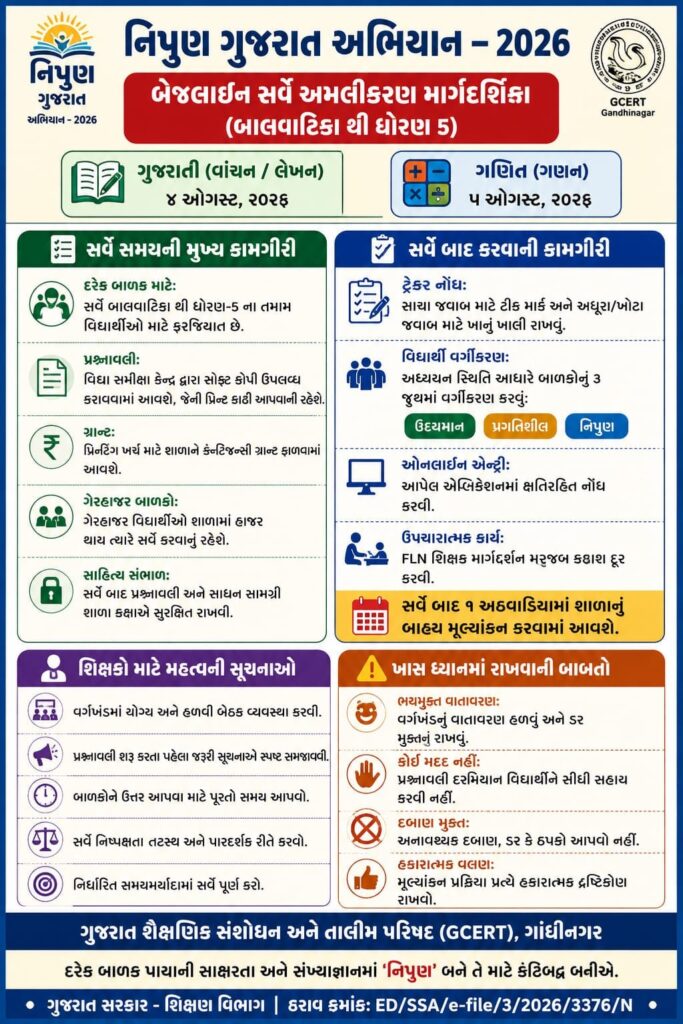
✅ નિપૂણ ગુજરાત બાયસેગ ટેલિકોન્ફરન્સ

Previous year papers help students understand the exam pattern, improve time management, and gain confidence before the actual examination. They also provide insight into the types of questions that are frequently asked.

Gyansadhana Old Question Paper – Overview

વિગતમાહિતી
પરીક્ષાનું નામGyansadhana Scholarship Examination
આયોજક સંસ્થાState Examination Board (SEB), Gujarat
પરીક્ષાનો હેતુધોરણ 8 પછીના વિદ્યાર્થીઓને શિષ્યવૃત્તિ માટે પસંદ કરવી
પરીક્ષા સ્તરાજ્ય કક્ષાની શિષ્યવૃત્તિ પરીક્ષા
પ્રશ્નપત્ર પ્રકારMultiple Choice Questions (MCQs)
પ્રશ્નોની ભાષાગુજરાતી / English (સૂચના મુજબ)
પ્રશ્નપત્ર PDFઅગાઉના વર્ષોના પ્રશ્નપત્રો ઉપલબ્ધ
Answer Keyઅધિકૃત / અનધિકૃત Answer Key ઉપલબ્ધ
ઉપયોગપરીક્ષા પેટર્ન સમજવા અને પ્રેક્ટિસ માટે
તૈયારી માટે શ્રેષ્ઠ સાધનPrevious Year Papers + Mock Tests + Syllabus
ડાઉનલોડ ફોર્મેટPDF

Why Should You Solve Gyansadhana Old Question Papers?

Practising previous year question papers offers several advantages:

  • Understand the latest examination pattern.
  • Learn the marking scheme and question distribution.
  • Identify important and repeated topics.
  • Improve speed and accuracy.
  • Enhance logical reasoning and problem-solving skills.
  • Build confidence for the final examination.
  • Reduce exam anxiety through regular practice.

Students who regularly solve old papers are generally better prepared for the actual exam.

Gyansadhana Exam Pattern

Although the official pattern may be updated from time to time, the examination generally includes questions from the following areas:

  • Mathematics
  • Mental Ability
  • Logical Reasoning
  • General Knowledge
  • Gujarati Language
  • English Language
  • Science
  • Social Science

Candidates should always check the latest official notification before starting their preparation.

Benefits of Downloading Previous Year Papers PDF

Downloading the PDF version of old papers provides several benefits:

  • Practice anytime without an internet connection.
  • Print papers for offline study.
  • Attempt full-length mock tests.
  • Track preparation progress.
  • Revise important concepts repeatedly.
  • Compare answers using the official answer key.

Gyansadhana Previous Year Question Papers

વર્ષપ્રશ્નપત્ર (PDF)
Gyansadhana 2025PDF Download
Gyansadhana 2024PDF Download
Gyansadhana 2023PDF Download

વેબસાઇટ www.educationparipatr.com પર ડાઉનલોડ લિંક સાથે અપડેટ કરી શકો છો, જેથી વિદ્યાર્થીઓને તમામ વર્ષના પ્રશ્નપત્રો અને Answer Key એક જ જગ્યાએ સરળતાથી મળી રહે.

Benefits of Downloading Previous Year Papers PDF

Downloading the PDF version of old papers provides several benefits:

  • Practice anytime without an internet connection.
  • Print papers for offline study.
  • Attempt full-length mock tests.
  • Track preparation progress.
  • Revise important concepts repeatedly.
  • Compare answers using the official answer key.

How to Prepare Using Old Question Papers

Follow these simple steps for effective preparation:

  • Complete the syllabus first.
  • Download previous year papers.
  • Solve one paper within the actual exam time.
  • Check your answers carefully.
  • Analyse mistakes and revise weak topics.
  • Repeat the process every week.
  • Attempt mock tests before the examination.

Consistent practice improves confidence and performance.

Best Preparation Tips for Gyansadhana Exam

Prepare a daily study timetable.

Revise important formulas and concepts.

Read textbooks thoroughly.

Practice Mathematics every day.

Solve reasoning questions regularly.

Improve reading comprehension skills.

Attempt at least one previous year paper every week.

Stay confident and maintain a positive attitude.

Why Choose Previous Year Papers?

Old question papers are among the most reliable preparation resources because they:

Reflect the actual exam difficulty.

Help students understand question trends.

Improve accuracy through repeated practice.

Strengthen conceptual understanding.

Increase confidence before the examination.

Frequently Asked Questions (FAQs)

Why should I solve Gyansadhana old question papers?

They help you understand the exam pattern, improve speed, and increase confidence.

Are previous year papers enough for preparation?

No. They should be used along with the latest syllabus, textbooks, and mock tests.

Exact questions may not repeat, but similar concepts and question patterns are often seen.

Conclusion

Gyansadhana Old Question Papers are an essential resource for every scholarship aspirant. Regular practice helps students improve accuracy, understand the exam pattern, strengthen concepts, and develop effective time management skills. Combined with proper revision and mock tests, previous year papers can significantly improve your chances of success.

Stay connected with www.educationparipatr.com for the latest Gyansadhana Old Question Papers PDF, Answer Keys, Scholarship Updates, Study Materials, Syllabus, Preparation Tips, and Exam Notifications.

 HTAT Old Question Paper With Answer Key

8th Pay Commission News jully 2026 news by sansad click here

July 2026
M T W T F S S
 12345
6789101112
13141516171819
20212223242526
2728293031  

 HTAT Old Question Paper With Answer Key

HTAT Old Question Paper With Answer Key

Download HTAT Old Question Papers with Answer Key PDF. Practice previous year papers, understand exam pattern, improve accuracy, and prepare effectively for the Gujarat HTAT Exam.

HTAT Old Question Paper with Answer Key – Complete Guide for Smart Preparation

Preparing for the Gujarat Head Teacher Aptitude Test (HTAT) requires consistent practice and a clear understanding of the examination pattern. One of the most effective resources for success is HTAT Old Question Papers with Answer Keys. Previous year papers help candidates understand the types of questions asked, important topics, difficulty level, and time management strategies.

✅ નિપૂણ ગુજરાત બાયસેગ ટેલિકોન્ફરન્સ

If you are planning to crack the HTAT examination, solving old question papers should be an essential part of your preparation strategy.

Why Should You Solve HTAT Old Question Papers?

Practising previous year papers offers numerous benefits, including:

  • Understand the latest HTAT exam pattern.
  • Identify frequently asked topics.
  • Improve speed and accuracy.
  • Build confidence before the examination.
  • Learn effective time management.
  • Analyse strengths and weaknesses.
  • Reduce exam stress.

Regular practice can significantly improve your performance in the final examination.

HTAT Exam Pattern Overview

Before solving old papers, candidates should understand the examination structure.

The HTAT examination generally includes questions related to:

  • Educational Psychology
  • Child Development
  • School Administration
  • Educational Management
  • Current Affairs
  • General Knowledge
  • Gujarat Education Policies
  • Language Skills
  • Reasoning Ability

Candidates should always verify the latest official syllabus and exam pattern before starting their preparation, as these may change over time.

Benefits of Using Answer Keys

An answer key is more than just a scoring tool.

  • It helps candidates to:
  • Verify correct answers.
  • Understand mistakes.
  • Learn accurate solving methods.
  • Improve conceptual clarity.
  • Estimate expected marks.
  • Track preparation progress.

Reviewing incorrect answers after every practice session is one of the fastest ways to improve.

How to Use HTAT Previous Year Papers Effectively

Follow these simple steps:

  • Complete the syllabus first.
  • Solve one paper in exam conditions.
  • Check answers using the answer key.
  • Analyse every mistake carefully.
  • Revise weak topics.
  • Repeat with another paper.
  • Continue mock test practice regularly.

Following this strategy consistently can lead to noticeable improvement.

Best Preparation Tips for HTAT Aspirants

  • To maximise your score:
  • Prepare a daily study schedule.
  • Revise educational concepts regularly.
  • Read current affairs daily.
  • Solve previous year papers every week.
  • Attempt full-length mock tests.
  • Maintain short revision notes.
    • Focus on accuracy instead of guessing.
  • Improve time management skills.

Htat Answer Key

2015 Answer KeyClick Here
2014 Answer KeyClick Here
2013 Answer KeyClick Here
2012 Answer keyClick Here

HTAT old question papers pdf

Frequently Asked Questions (FAQs)

Why are HTAT old question papers important?

They help candidates understand the exam pattern, important topics, and improve confidence through regular practice.

Are answer keys reliable for preparation?

Yes. Answer keys help evaluate performance and identify mistakes for better revision.

How many previous year papers should I solve?

Practising at least the last 5–10 years of available papers is recommended.

Conclusion

HTAT Old Question Papers with Answer Keys are among the most valuable study resources for every aspirant. Regular practice helps candidates understand the exam pattern, improve speed, minimise mistakes, and boost confidence. Along with the latest syllabus, mock tests, and consistent revision, previous year papers can greatly enhance your chances of success in the Gujarat HTAT examination.

8th Pay Commission News jully 2026 news by sansad click here

WhatsApp GroupJoin Now
Telegram GroupJoin Now
WhatsApp ChenalJoin Now
WhatsApp Group2  Join Now
WhatsApp Group3  Join Now
July 2026
M T W T F S S
 12345
6789101112
13141516171819
20212223242526
2728293031  

8th Pay Commission News jully 2026

8th Pay Commission News jully 2026

8th Pay Commission News: 8મા પગાર પંચ 3 મે, 2027 સુધીમાં પગાર વધારા અંગેનો પોતાનો અંતિમ અહેવાલ રજૂ કરશે. આ વાતનો ખુલાસો નાણા રાજ્યમંત્રી પંકજ ચૌધરીએ કર્યો હતો
…તો આ તારીખ સુધીમાં રિપોર્ટ સોંપશે આઠમું પગાર પંચ… સંસદમાં થયો મોટો ખુલાસો
આ વાતનો ખુલાસો નાણા રાજ્યમંત્રી પંકજ ચૌધરીએ કર્યો હતો

8th Pay Commission News: 8મા પગાર પંચ 3 મે, 2027 સુધીમાં પગાર વધારા અંગેનો પોતાનો અંતિમ અહેવાલ રજૂ કરશે. આ વાતનો ખુલાસો નાણા રાજ્યમંત્રી પંકજ ચૌધરીએ કર્યો હતો. સરકારે સંસદમાં સ્પષ્ટપણે જણાવ્યું છે કે 3 નવેમ્બર, 2025ના રોજ રચાયેલા આયોગને તેની ભલામણો રજૂ કરવા માટે 18 મહિનાનો સમય આપવામાં આવ્યો છે.

મંગળવાર, 28 જુલાઈના રોજ રાજ્યસભામાં એક પ્રશ્નના જવાબમાં તેમણે કહ્યું હતું કે , “સરકારે 3 નવેમ્બર, 2025ના રોજ 8મા કેન્દ્રીય પગાર પંચની રચના માટે એક ઠરાવ બહાર પાડ્યો છે, જેમાં તેના કાર્યપદ્ધતિના નિયમો (ToR) પણ શામેલ છે.” સરકારે સંસદને માહિતી આપી હતી કે 8મા પગાર પંચ પોતાની પ્રક્રિયાઓ નક્કી કરવા માટે સ્વતંત્ર છે. આ સમયગાળા દરમિયાન, કમિશનને કેન્દ્ર સરકારને કોઈપણ વચગાળાનો પ્રગતિ અહેવાલ રજૂ કરવાની જરૂર નથી.

પગાર વધારો ક્યારે આવશે?

જો 8મું પગાર પંચ 2027 સુધીમાં તેનો અંતિમ અહેવાલ રજૂ કરે, તો પણ તે 1 જાન્યુઆરી, 2026 થી જ લાગુ કરવામાં આવશે. ભારતમાં દર 10 વર્ષે એક નવું પગાર પંચ લાગુ કરવામાં આવે છે. 7મું પગાર પંચ 1 જાન્યુઆરી, 2016ના રોજ અમલમાં આવ્યું. તે મુજબ 8મું પગાર પંચ 1 જાન્યુઆરી, 2026 થી લાગુ માનવામાં આવશે. હવે, અંતિમ અહેવાલ મે મહિનામાં આવવાનો હોવાથી કેન્દ્ર સરકાર દ્વારા તેની સમીક્ષા અને મંજૂરી આપવી પડશે, જેમાં થોડા વધુ મહિના લાગવાની શક્યતા છે. તેથી વધેલા પગાર અને ભથ્થાંની સંપૂર્ણ રકમ જાન્યુઆરી 2026 થી નવા નિયમો અમલમાં આવે ત્યાં સુધી કર્મચારીઓના ખાતામાં એકંદર બાકી રકમ તરીકે ટ્રાન્સફર કરવામાં આવશે. આનો અર્થ એ છે કે કર્મચારીઓ અને પેન્શનરોને 16-18 મહિનાનો નોંધપાત્ર બાકી રકમ મળશે.

સરકારે સંસદમાં જણાવ્યું છે કે 1 જાન્યુઆરી, 2006 થી 31 ઓગસ્ટ, 2008ની વચ્ચે નિવૃત્ત થયેલા કેન્દ્ર સરકારના કર્મચારીઓને મોડિફાઇડ એશ્યોર્ડ કરિયર પ્રોગ્રેશન (MACP) લાભ મળી શકશે નહીં. સરકાર જણાવે છે કે આ યોજના સપ્ટેમ્બર 2008 માં અમલમાં આવી હોવાથી, તે સમય પહેલા નિવૃત્ત થયેલા કર્મચારીઓને તેનો લાભ આપવાનો કોઈ પ્રશ્ન જ નથી. આનો અર્થ એ છે કે ફક્ત 1 સપ્ટેમ્બર, 2008 ના રોજ અથવા તે પછી સેવામાં રહેલા કર્મચારીઓ જ આ લાભ માટે પાત્ર રહેશે.

MACP શું છે?

આ યોજના એવા કર્મચારીઓ માટે શરૂ કરવામાં આવી હતી જેઓ સમયસર પ્રમોશન મેળવી શક્યા ન હતા. આ યોજના હેઠળ કર્મચારીઓને 10, 20 અને 30 વર્ષની નિયમિત સેવા પૂર્ણ કર્યા પછી અથવા 10 વર્ષ સુધી સમાન ગ્રેડ પેમાં રહ્યા પછી પ્રમોશન મળતું હતું. તેમને ત્રણ નાણાકીય અપગ્રેડ મળ્યા. ગ્રુપ C અને ગ્રુપ D હેઠળના કર્મચારીઓ માટે આ ખાસ કરીને મહત્વપૂર્ણ હતું, કારણ કે તેમની પાસે પ્રમોશનની મર્યાદિત તકો હતી. જોકે, સરકારે હવે સ્પષ્ટતા કરી છે કે છઠ્ઠા પગાર પંચ હેઠળ 2006 થી 2008 ની વચ્ચે નિવૃત્ત થયેલા કર્મચારીઓ આ યોજનાનો લાભ મેળવી શકશે નહીં.

મુખ્ય વિગતો અને સ્પષ્ટતા 8 pay

આ ભારત સરકારના નાણાં મંત્રાલય દ્વારા રાજ્યસભામાં ૮મા પગાર પંચ (8th Pay Commission) અંગે પૂછાયેલા પ્રશ્નનો આપેલો સત્તાવાર લેખિત જવાબ છે.

સરળ ગુજરાતી ભાષામાં આ પત્રમાં શું કહેવામાં આવ્યું છે તે નીચે મુજબ છે:

૧. સરકારે કમિશન બનાવી દીધું છે: ગૃહમાં રાજ્યસભા સાંસદ શ્રી જાવેદ અલી ખાને પ્રશ્ન પૂછ્યો હતો. તેના જવાબમાં નાણાં રાજ્ય મંત્રી શ્રી પંકજ ચૌધરીએ જણાવ્યું કે સરકારે ૩ નવેમ્બર ૨૦૨૫ ના રોજ આદેશ (Resolution) બહાર પાડીને ૮મા કેન્દ્રીય પગાર પંચનું ગઠન કરી દીધું છે.

૨. બેઠકો અને સંઘો સાથે ચર્ચા (પ્રશ્ન a થી d નો જવાબ): સંસદસભ્યે પૂછ્યું હતું કે પગાર પંચની કેટલી બેઠકો થઈ, કર્મચારી યુનિયનો સાથે શું ચર્ચા થઈ અને શું યુનિયનોએ પરિવારના સભ્યોની સંખ્યા ૩ થી વધારીને ૫ ગણવાની માગ કરી છે?

  • સરકારનો જવાબ: પગાર પંચ પોતાની કામગીરી અને પ્રક્રિયા પોતે જ નક્કી કરે છે. નિયમો મુજબ પંચ તેની રોજબરોજની બેઠકો, ચર્ચાઓ કે ભલામણોની પ્રગતિ અંગે સરકારને સતત અપડેટ આપવા બંધાયેલું નથી.

૩. રિપોર્ટ ક્યારે આવશે? (પ્રશ્ન e નો જવાબ): સરકારનો જવાબ: આદેશ મુજબ, ૮મા પગાર પંચે ગઠનની તારીખથી ૧૮ મહિનાની અંદર (એટલે કે મે ૨૦૨૭ સુધીમાં) પોતાની ભલામણો સરકારને રજૂ કરવાની રહેશે.

Std-4 Gujarati – Learning Outcomes (Sem-1, Year 2026-27)

૮મા પગાર પંચ (8th Pay Commission)જવાબ
૩ નવેમ્બર ૨૦૨૫ ના રોજ આદેશ (Resolution) ૮મા કેન્દ્રીય પગાર પંચનું ગઠન કરી દીધું
પગાર પંચની કેટલી બેઠકો થઈપગાર પંચ પોતાની કામગીરી અને પ્રક્રિયા પોતે જ નક્કી કરે છે
રિપોર્ટ ક્યારે આવશે? (પ્રશ્ન e નો જવાબ): સરકારનો જવાબ:૮મા પગાર પંચે ગઠનની તારીખથી ૧૮ મહિનાની અંદર (એટલે કે મે ૨૦૨૭ સુધીમાં) પોતાની ભલામણો સરકારને રજૂ કરવાની રહેશે.

✅ નિપૂણ ગુજરાત બાયસેગ ટેલિકોન્ફરન્સ

July 2026
M T W T F S S
 12345
6789101112
13141516171819
20212223242526
2728293031  

RRB Section Controller Recruitment 2026: Notification Out for 119 Posts (CEN 03/2026)

RRB Section Controller Recruitment 2026: Notification Out for 119 Posts (CEN 03/2026)

RRB Section Controller Recruitment 2026 notification released for 119 posts (CEN 03/2026). Check eligibility, pay scale, age limit, and apply online before Aug 14, 2026.

Railway Recruitment Boards (RRBs) have officially released the advertisement notice CEN No. 03/2026 for the 
 recruitment of Section Controller posts across various Zonal Railways in India. Candidates looking for a career in Indian Railways can submit their applications online starting from July 15, 2026, with the submission deadline set for August 14, 2026.

Download Jawahar Navodaya Entrance Exam Practice Paper PDF

Below is the complete overview of eligibility criteria, important dates, scale of pay, medical standard, and the online application procedure

Key Highlights & Important Dates : RRB Section Controller Recruitment 2026

Overview DetailsImportant Information
Recruitment BodyRailway Recruitment Boards (RRBs)
Advertisement No.Centralised Employment Notification (CEN) No. 03/2026
Post NameSection Controller
Total Vacancies119 Posts (All RRBs combined)
Pay Level (7th CPC)Level 6 (Initial Pay: ₹35,400/-)
Application ModeOnline Only ([https://www.rrbapply.gov.in](https://www.rrbapply.gov.in))
Application Opening DateJuly 15, 2026 (Tentative)
Application Closing DateAugust 14, 2026 (up to 23:59 hrs)

Vacancy :RRB Section Controller Recruitment 2026

The recruitment will be conducted across different Railway Zones.

Railway ZoneVacancies
Central Railway08
East Coast Railway06
East Central Railway17
Eastern Railway07
North Central Railway02
North Eastern Railway05
Northeast Frontier Railway06
Northern Railway08
South Central Railway05
South East Central Railway02
South Eastern Railway14
Southern Railway13
South Western Railway08
West Central Railway05
Western Railway13
Total119

Eligibility Criteria : RRB Section Controller Recruitment 2026

1. Educational Qualification

  • Candidates must possess a Bachelor’s Degree in any stream from a recognized University or Institute in India.Recruitment & Staffing
  • Detailed educational subject-wise criteria will be published in the detailed CEN.

2. Age Limit (As on 01.07.2026)

  • Minimum Age: 20 Years
  • Maximum Age: 33 Years
  • Age relaxation applies to reserved categories (OBC, SC, ST, Ex-Servicemen, etc.) as per Central Government Rules.

3. Medical Standard

  • Medical Fitness Standard: A-2
  • Candidates must pass the specific medical examination (including strict visual acuity standards for A-2) to be eligible for appointment.

Salary Details : RRB Section Controller Recruitment 2026

One of the biggest attractions of this recruitment is the salary package offered by Indian Railways

Post NameInitial Pay
Section Controller₹35,400/- Per Month

Apart from the basic pay, selected candidates may also receive:

  • Dearness Allowance (DA)
  • House Rent Allowance (HRA)
  • Transport Allowance
  • Medical Facilities
  • Railway Pass Benefits
  • Pension and Other Government Benefits

The final salary package can be significantly higher after adding allowances.

Application Fee : RRB Section Controller Recruitment 2026

CategoryApplication Fee
General / OBC₹500/-
SC / ST / PwBD / Female Candidates₹250/-

Payment Mode: Online

Selection Process : RRB Section Controller Recruitment 2026

The selection process for RRB Section Controller typically involves the following stages:

  1. Computer-Based Test (CBT)
  2. Computer Based Aptitude Test (CBAT)
  3. Document Verification (DV)
  4. Medical Examination

How to Apply : RRB Section Controller Recruitment 2026

  1. Visit the official portal rrbapply.gov.in or your regional RRB website.
  2. Click on the link for CEN 03/2026 – Section Controller Recruitment.
  3. Complete the registration process by entering basic personal details, mobile number, and email ID.
  4. Authenticate details with Aadhaar verification.
  5. Log in to fill out the educational details, select category preferences, and upload required scanned documents.
  6. Pay the prescribed application fee online and submit your application form.
  7. Save and print a copy of the completed application form for future reference.

Important Links

DescriptionLink
Official Websitehttps://rrb.indianrailways.gov.in/chandigarh
Home Pageclick here

Frequently Asked Questions (FAQs)

Q1: What is the total number of vacancies in RRB Section Controller Recruitment 2026?

A: A total of 119 vacancies have been announced across all participating RRBs.

Desclaimer:

The information provided above is for general informational purposes only based on the official indicative notification (CEN No. 03/2026) issued by Railway Recruitment Boards. Candidates are strongly advised to verify all details, eligibility criteria, and updates directly from the official RRB portals (rrbapply.gov.in or respective zonal websites) before applying. We do not guarantee the completeness or accuracy of third-party notifications and are not responsible for any official changes made by the recruitment authority

WhatsApp GroupJoin Now
Telegram GroupJoin Now
WhatsApp ChenalJoin Now
WhatsApp Group2  Join Now
WhatsApp Group3  Join Now
July 2026
M T W T F S S
 12345
6789101112
13141516171819
20212223242526
2728293031  

Navodaya Admission Class 6 2027 : Apply Online, Eligibility, Last Date & Official Registration

Navodaya Admission Class 6 2027 : Apply Online, Eligibility, Last Date & Official Registration

What is Navodaya Admission Class 6?

Navodaya Admission Class 6 is the entrance process conducted by the Navodaya Vidyalaya Samiti (NVS) for admission to Class VI in Jawahar Navodaya Vidyalayas (JNVs). Every year, lakhs of students from across India apply for this prestigious entrance examination to secure admission to one of the country’s best government residential schools.

Jawahar Navodaya Vidyalayas are fully residential co-educational schools established by the Government of India under the Ministry of  Education. These schools provide high-quality education completely free of cost to talented students, especially those from rural areas. Students selected through the Jawahar Navodaya Vidyalaya Selection Test (JNVST) receive free education, accommodation, meals, textbooks, uniforms, and several other facilities.

The Navodaya Admission Class 6 2027 application process has officially started. Eligible students studying in Class V during the academic session 2026–27 can submit their online application before the last date.

નવોદય નું ફોર્મ ભરવા માટે અહીં ક્લિક કરો.

પ્રમાણપત્ર ડાઉનલોડ કરવા માટે અહીં ક્લિક કરો 

Download Jawahar Navodaya Entrance Exam Practice Paper PDF

About Jawahar Navodaya Vidyalaya

awahar Navodaya Vidyalayas were established to identify talented children and provide them with quality education regardless of their family’s financial background. These schools follow the CBSE curriculum and focus on academic excellence, leadership, discipline, sports, cultural development, and personality enhancement.

Currently, hundreds of Jawahar Navodaya Vidyalayas are functioning across India, offering modern  educational facilities in a fully residential environment.

Why Choose Navodaya Vidyalaya?

Choosing a Jawahar Navodaya Vidyalaya offers several advantages for students and parents

Free Quality Education

Students receive completely free education from Class VI onwards, making JNV one of the most affordable and prestigious schooling options in India.

Residential Campus

Each school provides separate hostel facilities for boys and girls, ensuring a safe and disciplined learning environment.

CBSE Curriculum

All Jawahar Navodaya Vidyalayas are affiliated with the Central Board of Secondary Education (CBSE), preparing students for higher education and competitive examinations.

Overall Personality Development

Apart from academics, students participate in sports, NCC, Scouts & Guides, cultural activities, science exhibitions, and leadership programmes.

Navodaya Admission 2027 Highlights

The admission process is conducted through the Jawahar Navodaya Vidyalaya Selection Test (JNVST). Students are selected purely on merit after qualifying in the entrance examination.

ParticularDetails
Admission NameNavodaya Admission Class 6 2027
Conducting AuthorityNavodaya Vidyalaya Samiti (NVS)
Admission ForClass VI
Academic Session2027–28
Application ModeOnline
Selection TestJNVST 2027
Application FeeFree
School TypeGovernment Residential School

Official Website

Students should complete the registration process only through the official Navodaya admission portal. Always avoid unofficial websites to protect your personal information and application details

Important Dates for Navodaya Admission Class 6 2027

Candidates should complete the online application well before the deadline to avoid last-minute technical issues.

EventDate
Online Application StartsAvailable Now
Last Date to Apply31 July 2026
JNVST Examination Date28 November 2026
Admit Card ReleaseBefore Examination
Expected ResultMarch 2027

Last Date to Apply

The last date to submit the online application form is 31 July 2026. Students should complete the registration process as early as possible to avoid server congestion during the final days.

Examination Date

The Jawahar Navodaya Vidyalaya Selection Test (JNVST) for Class VI admission is scheduled to be conducted on 28 November 2026.

Expected Result Date

Based on the admission schedule, the result is expected to be declared in March 2027. Candidates will be able to check their selection status online after the official announcement.

Why Should You Apply Early?

Many applicants wait until the final day to submit their forms, which often leads to slow website performance or incomplete registrations. Applying early gives students enough time to verify their information, upload documents correctly, and make corrections if required.

Parents should also begin collecting all necessary documents in advance so that the application process can be completed without any difficulty.

Navodaya Admission Class 6 Eligibility Criteria

Before filling out the online application form, every student and parent should carefully check the eligibility requirements announced by the Navodaya Vidyalaya Samiti (NVS). Candidates who do not satisfy the prescribed conditions may have their application or admission cancelled during document verification.

The eligibility criteria mainly include the student’s age, educational qualification, district of residence, and school of study.

Educational Qualification

To apply for Navodaya Admission Class 6 2027, the candidate must be studying in Class V during the academic session 2026–27 in a Government, Government-aided, Government-recognized school, or an approved National Institute of Open Schooling (NIOS) center.

Students who have already passed Class V in previous academic years or are repeating Class V are not eligible to apply.

Study Requirement

The candidate must have successfully completed one full academic session in:

  • Class III
  • Class IV
  • Class V

Students who skipped Class III or Class IV are not eligible for admission.

Age Limit for Navodaya Admission Class 6

The age limit is one of the most important eligibility conditions for JNVST 2027.

Date of Birth Criteria

A candidate must be born on or after 01 May 2015 and on or before 31 July 2017 (both dates inclusive).

This age criterion applies to all candidates, including:

  • General Category
  • OBC
  • SC
  • ST
  • EWS
  • Divyang (Persons with Disabilities)

Parents should ensure that the student’s date of birth in the school records exactly matches the Birth Certificate and Aadhaar Card

District Eligibility

Admission to Jawahar Navodaya Vidyalaya is district-specific.

Who Can Apply?

A student can apply only for the Jawahar Navodaya Vidyalaya located in the district where they are a bona fide resident.

Education

In certain cases, a student studying in a neighbouring district may still be eligible if the school is within the prescribed distance from the student’s residence and other official conditions are fulfilled.

Residence Proof

During admission, parents must submit valid residence proof issued by the competent Government authority.

Rural and Urban Reservation

Navodaya Vidyalaya Samiti provides reservation for both Rural and Urban candidates.

Rural Quota

At least 75% of the available seats are reserved for eligible students studying in rural areas.

To qualify under the rural quota, the candidate should have studied Class III, IV, and V in Government or Government-recognized schools located in rural areas.

Urban Candidates

Students studying in schools located in urban areas are considered Urban Category candidates.

Education

Urban students can also apply for admission and compete for the remaining seats according to the reservation policy.

Rural or Urban Status

The Rural or Urban category depends on the official location of the school where the candidate studied Class III, IV, and V, not simply on the student’s home address.

Reservation Policy

Navodaya Vidyalaya Samiti follows the reservation policy prescribed by the Government of India.

Reservation for SC and ST

Seats are reserved for Scheduled Caste (SC) and Scheduled Tribe (ST) candidates according to the population of the respective district.

Reservation for OBC

27% reservation is available for candidates belonging to the Central OBC List.

Only a valid Central OBC Certificate issued by the competent authority is accepted.

Reservation for Girls

At least one-third of the total seats are reserved for girl students

Reservation for Divyang Candidates

Reservation is also available for eligible candidates with benchmark disabilities as per Government of India norms.

Required Documents for Navodaya Admission Class 6

Candidates should keep all required documents ready before starting the online registration process.

Mandatory Documents

  • Student’s Aadhaar CardEducation
  • Parent’s Aadhaar Card (Residence Proof)
  • Passport-size Photograph of the Candidate
  • Candidate’s Signature
  • Parent’s Signature
  • Valid Mobile Number
  • Active Email ID (if available)

Additional Documents (If Applicable)

  • Caste Certificate (SC/ST/OBC)
  • Income Certificate
  • Disability Certificate (UDID)
  • Residence Certificate (if Aadhaar is unavailable)

Before uploading documents, ensure that:

  • Images are clear and readable.
  • Photograph and signatures are in JPG format.
  • File size follows the official instructions.
  • Blurred or cropped images are avoided.

Incorrect or unclear uploads may result in rejection during verification.

How to Apply Online for Navodaya Admission Class 6

The Navodaya Admission Class 6 2027 application process is completely online. Parents and students can submit the application form through the official Navodaya Vidyalaya Samiti (NVS) admission portal without paying any registration fee.

Education

Before starting the application, ensure that all required documents, such as the student’s Aadhaar Card, parent’s Aadhaar Card, photograph, signatures, and applicable certificates, are ready in the prescribed format.

Applying online is simple, but every detail must be entered carefully. Incorrect information may lead to rejection during document verification.

Step-by-Step Online Registration Process

Follow these steps to complete your Navodaya Admission Class 6 application successfully.

Step 1: Visit the Official Website

Open the official Navodaya Vidyalaya Samiti admission portal using your preferred web browser.

On the homepage, click on “Class VI Registration (JNVST 2027)” to begin the application process.

Step 2: Read the Instructions Carefully

Before filling out the form, carefully read all eligibility conditions, important instructions, and document requirements.

Proceed only if the student satisfies all eligibility criteria.

Education

Step 3: Enter Student Details

Fill in the student’s personal information exactly as mentioned in official documents.

Information generally includes:

  • Student’s Full Name
  • Date of Birth
  • Gender
  • Aadhaar Number
  • Category (General/OBC/SC/ST)
  • Disability Status (if applicable)
  • Rural or Urban Category

Double-check all details before moving to the next section.

Step 4: Enter School Details

Provide complete information about the school where the student is currently studying in Class V.

This may include:

  • School Name
  • District
  • State
  • School Address
  • School Type
  • Medium of Instruction

Make sure the district selected is correct because admission is district-specific.

Step 5: Enter Parent Details

Provide accurate information about the student’s parent or guardian.

Generally, the application requires:

  • Father’s Name
  • Mother’s Name
  • Parent’s Aadhaar Number
  • Mobile Number
  • Residential Address

Use an active mobile number because important updates may be communicated through it.

Step 6: Upload Required Documents

Upload all required documents in the prescribed format.

Documents usually include:

  • Student PhotographEducation
  • Candidate Signature
  • Parent Signature
  • Aadhaar Card
  • Caste Certificate (if applicable)
  • Income Certificate (if applicable)

Ensure every uploaded image is clear and readable.

Step 7: Review the Application

Before submitting the application, carefully verify every field.

Pay special attention to:

  • Student’s Name
  • Date of Birth
  • Aadhaar Number
  • Category
  • School DetailsEducation
  • District Selection
  • Uploaded Documents

Even a small mistake can create problems during document verification.

Step 8: Submit the Application

After reviewing all information, click the Submit button.

Once submitted successfully, an Application Number or Registration Number will be generated.

Save this number carefully because it will be required for future login, admit card download, and result checking.

Navodaya Gov In Login Process

After completing the registration, applicants can log in to the official admission portal whenever required.

When Is Login Required?

Candidates may need to log in for:

  • Checking application status
  • Downloading the confirmation page
  • Downloading the admit card
  • Viewing important updates
  • Checking the selection result

Always keep your login credentials safe.

Login Credentials

Generally, applicants need:

  • Registration Number
  • Date of Birth
  • Password or OTP (if applicable)

Enter the details exactly as provided during registration.

Forgot Registration Number?

If you forget your registration details, use the recovery option available on the official portal or refer to the confirmation page saved after submitting the application.

Application Correction

Sometimes parents notice mistakes after submitting the application form.

Can You Edit the Application?

If the Navodaya Vidyalaya Samiti provides an application correction window, candidates can update eligible fields during the specified period.

Primary & Secondary Schooling (K-12)

However, not every field can be modified after submission.

Details to Verify Before Submission

Before clicking the final submit button, verify:

  • Candidate’s Name
  • Date of Birth
  • Aadhaar Number
  • Category
  • District
  • Parent Information
  • Uploaded Photograph
  • Candidate Signature
  • Parent Signature

Reviewing the application carefully helps avoid unnecessary complications later.


Common Registration Mistakes to Avoid

Many applications are rejected because applicants make avoidable mistakes.

Incorrect Personal Information

Never enter a name or date of birth different from official school records or the Aadhaar Card.

Education

Wrong District Selection

Admission is based on the district of eligibility. Selecting the wrong district can result in cancellation of candidature.

Unclear Photograph

Avoid uploading:

  • Blurred images
  • Selfies
  • Dark photographs
  • Cropped pictures

Use a recent passport-size photograph with a plain background.

Incorrect Signature

The candidate and parent must upload their own signatures.

Do not upload typed names or signatures belonging to another person.

Last-Minute Registration

Thousands of students submit applications on the final day.

Education

Heavy traffic may slow down the website, causing delays or incomplete submissions. Complete the registration well before the last date.

Tips for a Successful Application

Following these simple tips can help ensure a smooth application process.

Keep Documents Ready

Arrange all required documents before starting the online form.

Use Correct Information

Enter details exactly as they appear in official records.

Check Internet Connection

A stable internet connection reduces the chances of errors while uploading documents.

Save the Confirmation Page

After successful submission, download or print the confirmation page for future reference.

Keep Registration Details Safe

Store the Application Number, Registration Number, and login credentials securely until the admission process is complete.


Completing the online application carefully is the first step toward securing admission to one of India’s most prestigious government residential schools. After registration, students should begin preparing for the Jawahar Navodaya Vidyalaya Selection Test (JNVST) to maximize their chances of selection.

Navodaya Admission Class 6 Exam Pattern

Understanding the Jawahar Navodaya Vidyalaya Selection Test (JNVST) exam pattern is one of the most important steps for students preparing for Navodaya Admission Class 6 2027. Knowing the structure of the examination helps candidates manage their time effectively and focus on the right topics.

The JNVST is an objective-type entrance examination designed to evaluate a student’s logical thinking, mathematical ability, environmental awareness, and language comprehension.

ParticularDetails
Examination NameJawahar Navodaya Vidyalaya Selection Test (JNVST)
Admission LevelClass VI
Mode of ExaminationOffline (OMR Based)
Question TypeMultiple Choice Questions (MCQs)
Total Questions80
Maximum Marks100
Duration2 Hours
Negative Markingno
Extra Time for Divyang Students40 Minutes

Students should answer all questions because there is no negative marking.

Section-wise Exam Pattern

The examination consists of three sections.

This section evaluates the student’s reasoning ability, observation skills, logical thinking, and awareness of the surrounding environment.

TopicQuestionsMarks
Mental Ability Test2025
Environmental Studies2025

This section carries the highest weightage in the examination.

Arithmetic Test

The Arithmetic section measures the student’s understanding of fundamental mathematical concepts learned in primary school.

Questionsmarks
2025

Students should practice calculations regularly to improve speed and accuracy.

Language Test

The Language section assesses reading comprehension and understanding skills.

Questionsmarks
2025

Candidates should carefully read each passage before answering the questions.

Marking Scheme

Understanding the marking scheme helps students plan their exam strategy.

Marks for Each Correct Answer

Each correct answer carries 1.25 marks.

Negative Marking

There is no negative marking in the JNVST examination.

Because there is no penalty for incorrect answers, students should attempt every question after careful consideration.

Education

Minimum Qualifying Marks

Candidates should aim to perform well in all three sections, as qualifying standards are applied during the selection process.

Medium of Examination

Students can choose their preferred language while filling out the online application form.

Available Languages

The examination is conducted in multiple regional languages depending on the state or union territory.

Some commonly available languages include:

  • English
  • Hindi
  • Gujarati
  • Marathi
  • Bengali
  • Telugu
  • Tamil
  • Kannada
  • Malayalam
  • Punjabi
  • Urdu
  • Assamese
  • Odia

Candidates should choose the examination language carefully during registration because changing the selected language later is generally not permitted.

Educational Resources

Complete JNVST Class 6 Syllabus

Unlike traditional school examinations, the JNVST syllabus focuses on aptitude and understanding rather than memorization.

Mental Ability Test Syllabus

The Mental Ability section tests logical reasoning and problem-solving skills.

Important Topics

  • Pattern Completion
  • Figure Series
  • Geometrical Figure Completion
  • Mirror Images
  • Water Images
  • Embedded Figures
  • Figure Matching
  • Odd One Out
  • Coding and Decoding
  • Direction Sense
  • Analogy
  • Classification
  • Logical Reasoning

Students should solve plenty of reasoning questions to improve their speed.

Education


Environmental Studies (EVS) Syllabus

The EVS section checks the student’s awareness of the world around them.

Important Topics

  • Our Environment
  • Plants and Animals
  • Rivers and Mountains
  • Weather and Climate
  • Natural Resources
  • Water Cycle
  • Pollution
  • Human Body
  • Food and Nutrition
  • Hygiene and Health
  • National Symbols
  • Indian States and Capitals
  • Festivals of India
  • Means of Transport
  • Conservation of Nature
  • Science in Daily Life

Reading NCERT EVS books for Classes III, IV, and V can be very helpful.


Arithmetic Syllabus

The Arithmetic section covers basic mathematics taught in primary classes.

Important Topics

  • Number System
  • Number Names
  • Place Value
  • Addition
  • Subtraction
  • Multiplication
  • Division
  • Factors and Multiples
  • Fractions
  • Time
  • Money
  • Measurement
  • Perimeter
  • Area
  • Geometry
  • Angles
  • Data Interpretation
  • Bar Graphs
  • Tables
  • Simplification

Accuracy and regular practice are the keys to scoring well in this section.


Language Syllabus

The Language Test focuses mainly on reading comprehension.

Educational Resources

Important Topics

  • Reading Passages
  • Vocabulary
  • Synonyms
  • Antonyms
  • Sentence Understanding
  • Word Meaning
  • Grammar Basics
  • Paragraph-Based Questions

Students should develop a habit of reading short stories and newspaper articles to improve comprehension skills.

Best Preparation Tips for Navodaya Admission Class 6

A smart preparation strategy significantly improves the chances of qualifying for the JNVST examination.

Primary & Secondary Schooling (K-12)

Understand the Exam Pattern

Before beginning your preparation, familiarize yourself with the latest exam pattern and syllabus.

Make a Daily Study Plan

Create a timetable that gives equal importance to:

  • Mental Ability
  • Arithmetic
  • Environmental Studies
  • Language

Consistency is more effective than studying for long hours occasionally.

Practice Previous Year Question Papers

Previous year papers help students understand:

  • Question difficulty
  • Frequently asked topics
  • Time management
  • Exam patternEducational Resources

Try solving papers within the actual examination time.

Solve Mock Tests

Weekly mock tests help students identify weak areas and improve confidence before the final examination.

Improve Mental Ability Skills

Reasoning questions require regular practice.

Spend at least 20–30 minutes every day solving puzzles, figure-based questions, and logical reasoning exercises.

Strengthen Basic Mathematics

Revise multiplication tables, fractions, measurements, and basic calculations daily.

Strong fundamentals help students solve arithmetic questions quickly.

Read Daily

Reading improves comprehension skills and vocabulary, which are essential for the Language Test.

Educational Resources

Students can read children’s magazines, storybooks, or newspapers suitable for their age.

Best Books for Navodaya Admission Class 6 Preparation

Selecting the right study material makes preparation easier.

Recommended Books

  • NCERT Class III EVS
  • NCERT Class IV EVS
  • NCERT Class V EVS
  • NCERT Mathematics (Classes III–V)
  • NCERT English Textbooks
  • Previous Year JNVST Question Papers
  • JNVST Practice Papers by reputed publishers

Students should avoid using too many books. It is better to thoroughly complete a few reliable resources than to study many books superficially.

Common Mistakes During Exam Preparation

Many students lose marks because of avoidable mistakes.

Ignoring Mental Ability

Mental Ability carries significant weightage, yet many students focus only on mathematics.

Not Solving Mock Tests

Without mock tests, students may struggle with time management during the actual examination.

Memorizing Instead of Understanding

The JNVST is designed to test concepts and logical thinking rather than rote learning.

Last-Minute Preparation

Preparing only a few days before the examination often leads to unnecessary stress. A steady and disciplined study routine throughout the preparation period is much more effective.

Educational Resources

With proper planning, regular practice, and a positive attitude, students can significantly improve their chances of securing admission to a Jawahar Navodaya Vidyalaya.

Navodaya Admit Card 2027

After successfully submitting the application form, candidates must download their JNVST 2027 Admit Card before appearing for the entrance examination. The admit card is a mandatory document and must be carried to the examination centre.

Without a valid admit card, candidates will not be allowed to enter the examination hall.

How to Download the Admit Card

Candidates can download their admit card by following these simple steps:

Step 1: Visit the Official Portal

Open the official Navodaya Vidyalaya Samiti admission website.

Step 2: Open the Admit Card Section

Click on the Class VI Admit Card link available on the homepage.

Step 3: Login to Your Account

Enter the required login details such as:

  • Registration Number
  • Date of Birth
  • Password or OTP (if required)

Step 4: Download the Admit Card

Verify all the details mentioned on the admit card and download the PDF.

Take at least two printed copies for future reference.

Details Mentioned on the Admit Card

Before the examination, carefully verify the following information:

Educational Resources

  • Candidate’s Name
  • Roll Number
  • Registration Number
  • Father’s Name
  • Examination Date
  • Examination Time
  • Examination Centre
  • Reporting Time
  • Candidate Photograph
  • Important Instructions

If any information is incorrect, contact the concerned authorities immediately.

Navodaya Admission Class 6 Result 2027

The Navodaya Result 2027 is expected to be announced after the successful completion of the entrance examination and evaluation process.

Primary & Secondary Schooling (K-12)

Students can check their results online using their login credentials.

How to Check Navodaya Result

Follow these steps to check your result:

Step 1

Visit the official Navodaya website.

Step 2

Click on JNVST Class VI Result 2027.

Step 3

Enter:

  • Registration Number
  • Roll Number (if required)
  • Date of Birth

Step 4

Click on Submit.

Your result will appear on the screen.

Download and print the result for future reference.

Selection Process

Selection for Navodaya Admission Class 6 is based entirely on merit and eligibility.

Primary & Secondary Schooling (K-12)

Written Examination

Students first appear for the Jawahar Navodaya Vidyalaya Selection Test (JNVST).

Merit List

After evaluation, NVS prepares a district-wise merit list based on candidates’ performance.

Document Verification

Provisionally selected candidates must attend document verification with all original documents.

Final Admission

Admission is confirmed only after successful verification of all documents and eligibility conditions.

Documents Required After Selection

Candidates should carry original documents during verification.

Mandatory Documents

  • Birth Certificate
  • Aadhaar Card
  • Parent’s Aadhaar Card
  • Residence Certificate
  • Class V Study CertificateTeaching & Classroom Resources
  • Passport-size Photographs
  • Candidate Signature
  • Parent Signature

If Applicable

  • Caste Certificate
  • Income Certificate
  • Disability Certificate
  • Rural Area Certificate

Failure to produce valid documents may result in cancellation of admission.

Facilities Available at Jawahar Navodaya Vidyalaya

One of the biggest reasons parents choose Navodaya Vidyalayas is the excellent facilities provided completely free of cost.

Free  Education

Students receive quality  education without paying tuition fees.

Education

Hostel Facilities

Separate hostels are available for boys and girls with proper supervision.

Free Meals

Nutritious breakfast, lunch, dinner, and evening snacks are provided.

Free Textbooks

Students receive textbooks and learning materials free of cost.

Uniforms

School uniforms are provided according to NVS guidelines.

Computer Labs

Modern computer laboratories help students develop digital skills.

Science Laboratories

Well-equipped Physics, Chemistry, and Biology laboratories encourage practical learning.

Library

Students have access to a rich collection of books, magazines, newspapers, and reference materials.

Education

Sports Facilities

Most JNV campuses provide facilities for:

  • Cricket
  • Football
  • Volleyball
  • Basketball
  • Athletics
  • Kabaddi
  • Kho-Kho
  • Indoor Games

Smart Learning Environment

Many schools now use digital classrooms, projectors, and modern teaching methods.

Benefits of Studying at Jawahar Navodaya Vidyalaya

Getting admission to a Jawahar Navodaya Vidyalaya offers long-term  educational and personal benefits.

Primary & Secondary Schooling (K-12)

High-Quality CBSE Education

Students study under the CBSE curriculum, preparing them for higher education and competitive examinations.

Experienced Teachers

Qualified and experienced teachers provide academic guidance and mentorship.

Personality Development

Students participate in debates, cultural programmes, leadership camps, and social activities that build confidence.

Competitive Exam Preparation

A strong academic foundation helps students prepare for examinations such as JEE, NEET, NDA, CUET, and Olympiads.

Equal Learning Opportunities

Students from different social and economic backgrounds learn together in an inclusive environment.

Education

Navodaya Admission Class 6 2027 is a valuable opportunity for talented students to receive quality education in one of India’s most respected government residential school systems. With free education, hostel facilities, experienced teachers, modern infrastructure, and a CBSE curriculum, Jawahar Navodaya Vidyalayas help students build a strong academic foundation and prepare for future success.

If your child is eligible, complete the online application before 31 July 2026, keep all required documents ready, and begin preparing for the Jawahar Navodaya Vidyalaya Selection Test (JNVST) without delay.

Early preparation, regular practice, and careful completion of the application process can significantly improve the chances of securing admission to a Jawahar Navodaya Vidyalaya.

WhatsApp GroupJoin Now
Telegram GroupJoin Now
WhatsApp ChenalJoin Now
WhatsApp Group2  Join Now
WhatsApp Group3  Join Now
July 2026
M T W T F S S
 12345
6789101112
13141516171819
20212223242526
2728293031  

G Card Hospital List Gujarat PDF Download 2026 | Ahmedabad અને Vadodara PMJAY Hospital List

G Card Hospital List Gujarat PDF Download 2026 | Ahmedabad અને Vadodara PMJAY Hospital List

Ahmedabad, Vadodara અને સમગ્ર ગુજરાતમાં Ayushman Card / G Card હેઠળ સારવાર આપતી hospital કેવી રીતે શોધવી તેની સંપૂર્ણ official guide.

G Card Hospital List Gujarat અથવા PMJAY G Card Hospital List શોધતા લોકોને ઘણીવાર જૂની PDF, અધૂરી WhatsApp list અથવા hospitalના બદલાયેલા statusને કારણે મુશ્કેલી થાય છે. આ guideમાં Gujaratની empanelled hospital list તપાસવાની official રીત, Ahmedabad અને Vadodara district filter, gynecologist અથવા બીજી speciality શોધવાની process અને આપેલી PDF download link—all in one place આપવામાં આવ્યા છે

સૌથી મહત્વપૂર્ણ નોંધ: નીચે આપેલી 25-page PDFનું title “MA PMJAY empanelled private hospitals Gujarat” છે અને તેની file metadata 28 February 2021 દર્શાવે છે. Hospitalનું empanelment, suspension, speciality અને contact details બદલાઈ શકે છે. તેથી PDFને reference તરીકે વાપરો, પરંતુ admission અથવા treatment પહેલાં live official portal અને hospital help desk પરથી eligibility જરૂર confirm કરો.

G Card અને Ayushman PM-JAY Card એક જ છે?

Searchમાં બંને શબ્દો સાથે વપરાય છે, પરંતુ beneficiary category એકસરખી હોવી જરૂરી નથી. સામાન્ય Ayushman Bharat PM-JAY eligible પરિવારોને empanelled hospitalમાં specified packages માટે cashless treatment access આપે છે. Gujaratમાં PMJAY-MA framework પણ ચાલે છે. બીજી તરફ “G Card” શબ્દનો ઉપયોગ Gujaratના eligible state government officers, employees, pensioners અને notified dependants માટેની G-category health coverageના સંદર્ભમાં થાય છે.

માત્ર hospital PM-JAY panelમાં હોવું એ દરેક card category, દરેક operation અથવા દરેક package ત્યાં ઉપલબ્ધ હોવાની guarantee નથી. Hospital પસંદ કરતી વખતે card category, package અને speciality ત્રણેય verify કરવાં.

Search termસાચો અર્થ / શું તપાસવું?
G Card hospital list GujaratG-category beneficiary માટે hospital અને package eligibility confirm કરો.
PMJAY hospital list PDFPDFની date તપાસો; latest status માટે live portal વાપરો.
Ayushman Card hospital list AhmedabadState Gujarat અને District Ahmedabad select કરો.
G Card hospital list VadodaraState Gujarat અને District Vadodara select કરીને hospital type/speciality filter કરો.
Ahmedabad gynecologist hospital listSpecialityમાં Obstetrics & Gynaecology જેવા relevant option પસંદ કરી package availability hospitalને પૂછો.

www.pmjay.gov.in Hospital List: Official Search Process

https://hospitals.pmjay.gov.in/Search/empnlWorkFlow.htm?actionFlag=ViewRegisteredHosptlsNew

  1. Stateમાં Gujarat પસંદ કરો.
  2. Districtમાં Ahmedabad, Vadodara અથવા તમારો જરૂરી જિલ્લો પસંદ કરો.
  3. જરૂર મુજબ Hospital Typeમાં Public અથવા Private પસંદ કરો.
  4. Speciality filterમાં જરૂરી સારવારનો વિભાગ પસંદ કરો. Maternity અથવા women’s health માટે portal પર ઉપલબ્ધ Obstetrics & Gynaecology સંબંધિત speciality શોધો.
  5. Hospital name, code, address અને contact details ધ્યાનથી તપાસો.
  6. Hospitalનો status suspended છે કે નહીં તે official suspended-hospitals sectionમાં પણ ચકાસો.
  7. Visit પહેલાં hospitalના Ayushman Mitra / PM-JAY deskને call કરીને card category અને required package active છે કે નહીં પૂછો.

https://hospitals.pmjay.gov.in/Search/empnlWorkFlow.htm?actionFlag=ViewRegisteredHosptlsNew

Ayushman Card Hospital List Ahmedabad PDF Download

આપેલી PDFમાં Ahmedabad districtના private hospitals માટે hospital code, name, address, pincode, nodal officer અને contact details જેવા columns છે. તેમાં maternity/general hospital સહિત અલગ પ્રકારની facilitiesના નામ હોઈ શકે છે; પરંતુ PDFમાં દરેક hospitalની current speciality/package eligibilityનો live status મળતો નથી.

  • Hospital હાલ PM-JAY / PMJAY-MA / G-categoryમાં active empanelled છે?
  • મારા cardની beneficiary category સ્વીકારવામાં આવે છે?
  • મારી સારવારનું exact package hospitalમાં active છે?
  • Pre-authorisation જરૂરી છે? Approvalમાં કેટલો સમય લાગી શકે?
  • કયા documents અને recent reports લાવવાના?
  • કોઈ non-covered consumable, OPD test અથવા medicineનો અલગ ખર્ચ છે?

Ayushman Card Hospital List Ahmedabad Gynecologist કેવી રીતે શોધવી?

“Ayushman card hospital list Ahmedabad gynecologist” માટે માત્ર hospitalના નામ પરથી નિર્ણય ન લેવો. Official portalમાં Gujarat → Ahmedabad પસંદ કર્યા પછી speciality filterમાં Obstetrics & Gynaecology અથવા portal પર દેખાતો સંબંધિત women’s-health package પસંદ કરો. પછી shortlisted hospitalને નીચેની બાબતો પૂછો

Confirm before admission: maternity package, normal delivery/C-section coverage, high-risk pregnancy facility, gynaec surgery package, NICU availability, female specialist availability અને pre-authorisation. OPD consultation તથા દરેક test scheme હેઠળ automatically covered હોય એવું માનવું નહીં.

Emergency અથવા pregnancy-related decisionમાં online article પર આધાર રાખવાને બદલે qualified doctor અને hospital scheme deskની સીધી સલાહ લો.

G Card Hospital List Vadodara કેવી રીતે તપાસવી?

Vadodara માટે પણ official process same છે: State Gujarat → District Vadodara → Hospital Type → Speciality. આપેલી જૂની PDFમાં Vadodara district હેઠળ private hospitalsનાં નામ અને contact details સામેલ છે, પણ current availability માટે live search જરૂરી છે. Heart, kidney, cancer, orthopaedic, eye, maternity અથવા બીજી સારવાર માટે speciality filter અલગથી લાગુ કરો.

Hospital જતી વખતે જરૂરી documents

Document ઉપયોગ
Ayushman / PMJAY-MA / G CardBeneficiary અને category verification
Aadhaar Card અથવા accepted photo IDIdentity verification
Mobile numberOTP અને communication માટે
Doctor prescription / referralDiagnosis અને planned treatment સમજાવવા
Reports, scans અને discharge papersPre-authorisation તથા medical assessment
Employee/pensioner/dependant proofG-categoryમાં લાગુ પડે ત્યારે

Original સાથે photocopy રાખવી ઉપયોગી છે. Hospital અને case પ્રમાણે additional documents માગી શકાય છે.

Cashless treatment એટલે બધું free?

Cashlessનો અર્થ approved package અને scheme rules હેઠળનો eligible hospitalization expense beneficiary પાસેથી advance લીધા વગર process થવો. તેનો અર્થ દરેક OPD visit, test, medicine, room choice અથવા scheme બહારની વસ્તુ free હોવી જરૂરી નથી. Admission પહેલાં package name, approval અને excluded itemsનું written clarification માંગો. કોઈ empanelled hospital approved package માટે ગેરરીતે charge કરે તો bill/receipt સાચવો અને official grievance channelનો સંપર્ક કરો.

Useful safety step: hospitalમાં પહોંચ્યા પછી સીધા Ayushman Mitra / scheme help desk પર card verify કરાવો. કોઈ middlemanને OTP, Aadhaar copy અથવા પૈસા આપતા પહેલાં તેની authority ચકાસો.

PDF List અને Live Official Listમાં કઈ વધુ વિશ્વસનીય?

PDF offline reference અને district-wise names ઝડપથી જોવા ઉપયોગી છે. પરંતુ suspension, new empanelment, package changes અને contact updates માટે official live portal વધુ વિશ્વસનીય છે. શ્રેષ્ઠ રીત:

  1. PDFમાંથી નજીકની hospitals shortlist કરો.
  2. Official portalમાં same hospital live search કરો.
  3. Suspended list તપાસો.
  4. Hospital scheme deskને call કરીને card category અને package confirm કરો.

આવી verified government scheme guides અને useful download posts માટે www.educationparipatr.comપર વધુ માહિતી વાંચી શકો છો.

Faq

1. G Card hospital list Gujarat ક્યાંથી મળશે?

Official PM-JAY empanelled hospital search portalમાં Gujarat અને district select કરીને live list જુઓ. G-category applicability hospital help deskથી confirm કરો.

City & Local Guides

2. PMJAY hospital list PDF latest છે?

આ postમાં આપેલી PDFની metadata February 2021 દર્શાવે છે, તેથી તે historical reference છે. Current status માટે official live portal વાપરો.

3. Ahmedabadમાં Ayushman gynecologist hospital કેવી રીતે શોધવી?

Official portalમાં Gujarat → Ahmedabad → relevant Obstetrics & Gynaecology speciality filter કરો અને exact treatment package hospitalને confirm કરો.

4. Vadodaraની private hospital list PDFમાં છે?

હા, આપેલી MA PMJAY private-hospital PDFમાં Vadodara entries છે; પરંતુ active empanelment અને package live portal પરથી ફરી તપાસવા.

5. PM-JAY hospitalમાં card બતાવવાથી તરત free treatment મળશે?

Beneficiary verification, eligible package અને જરૂરી pre-authorisation પર cashless approval આધારિત હોય છે. દરેક service automatically covered નથી.

6. Official PM-JAY helpline શું છે?

Official PM-JAY/NHA pages પર 14555 helpline દર્શાવવામાં આવે છે. Number અથવા service બદલાઈ શકે, તેથી official portal પર current contact પણ તપાસો.

Medical & Information Disclaimer: આ article informational purpose માટે છે. તે medical advice, treatment approval અથવા hospital empanelmentની guarantee નથી. Hospital status, benefits, package rules અને contacts બદલાઈ શકે છે. Treatment પહેલાં official portal, qualified doctor અને authorised hospital scheme deskથી verification કરો.

July 2026
M T W T F S S
 12345
6789101112
13141516171819
20212223242526
2728293031  

The Best Read Along Apps for Kids in 2026

The Best Read Along Apps for Kids in 2026

read-aloud app narrates stories to your child. The app reads; your child listens. These are fantastic for bedtime, for building vocabulary, for exposing kids to books above their reading level. Epic!, Vooks, Storyline Online — these are primarily read-aloud tools.

FLN ALL INFORMATION PEPAR MATRIYAL

read-along app works the other way around. Your child reads the story out loud, and the app listens. It follows along, highlights words, gently corrects mistakes, and encourages them to keep going. Google Read Along is the clearest example of this. The child is doing the work; the app is the audience

Both serve a purpose. But if what you want is something that builds reading fluency — the ability to read accurately, with appropriate speed — your child needs to be the one reading. An app that reads to them won’t build that skill. It’s the difference between watching someone swim and getting in the water yourself.

Keep this in mind as you work through the rest of this article.

બાલવાટિકા પ્રવેશ અને કેળવણી નિરીક્ષક ની પરીક્ષા ની તૈયારી માટેના અગત્યના પ્રશ્નો

Languages, Stories, and What’s in the Library

The library includes over 1,000 stories across 11 languages, including English, Spanish, Hindi, and several others. Stories are organized by difficulty level and theme, which lets you match content to where your child currently is — not where you wish they were. There are also word games tied to each story, offering a natural wind-down after reading.

For multilingual families, the language depth here is genuinely useful. A child who speaks Spanish at home and is learning to read in English can practice in both languages using the same app, with the same companion character. No switching apps, no re-learning an interface

How to Download and Set Up Read Along (Step by Step)

  • Open the Google Play Store and search for “Read Along by Google”
  • Tap Install — the app is free, with no in-app purchases
  • Open the app and follow the profile creation steps; Diya walks your child through this
  • Grant microphone permission when prompted — this is required for Diya to hear your child read
  • Choose a story from the Library tab; stories are sorted by level and theme
  • Download stories over Wi-Fi if you want offline access later

On a computer or laptop (web version):

  1. Open Chrome (or a compatible browser) and go to readalong.google.com
  2. Sign in with a Google account
  3. Allow microphone access when the browser prompts you
  4. Select a story and begin

The web version launched in beta in 2022 and contains the same story library and Diya functionality as the Android app. It’s particularly useful if you want a larger screen experience — reading on a tablet or laptop is significantly easier on young eyes than a phone screen

IMPORTANT LINKS

Read Along AppMobile App
Home PageVisit
Official Websiteclick here

Does Google Read Along Work on iPhone?

This is the most common point of confusion, and no one in the current search results answers it clearly: Google Read Along is not available on the Apple App Store. There is no iOS app.

iPhone and iPad users can access Read Along through the web version at readalong.google.com using Safari or Chrome. The functionality is largely equivalent, though some parents find the iOS browser experience slightly less polished than the Android native app. If your household runs entirely on Apple devices, the web version is your best option — it works, but it’s worth knowing upfront that you won’t find this in the App Store.

Privacy — Where Your Child’s Voice Data Goes

This deserves more than a line item. When a child uses an app that listens to them speak, the reasonable question is: where does that audio go?

With Google Read Along, voice recognition is processed directly on the device using Google’s on-device speech technology. Audio is not transmitted to Google’s servers for processing. The app does not require your  child to sign in with personal information to use the core reading features.

Parents who want to review the full data handling terms can find them through Google’s privacy policies, which govern the app’s behavior in the same way as other Google products. But the on-device audio processing is the key architectural point — and it’s one of the more parent-friendly design decisions in any  education app.

Using Read Along Offline

After you download story packs over Wi-Fi, Read Along works without an internet connection. Diya will still listen, highlight words, and give feedback. This is deliberately designed — the app was originally built for communities where reliable internet access is not a given.

Practically, this means you can load up stories before a car trip, a flight, or a weekend at a relative’s house with spotty internet, and the app will work exactly as it does at home.

Google Read Along in the Classroom

In June 2024, Google integrated Read Along directly into Google Classroom, expanding it significantly for educational use. Teachers using Google Workspace for Education can now assign specific stories to individual students, differentiated by Lexile level, grade level, or phonics skill. After students complete a session, teachers receive data on reading accuracy, speed, and comprehension.

The library available through Classroom includes 800+ fiction and non-fiction titles from publishers including Heggerty and ReadWorks. Students get Diya’s real-time assistance during reading, and the comprehension questions embedded in stories require active engagement rather than passive listening

Read Along by Google: Free Reading App for Kids to Improve Reading Skills

Parents usually search for Read Along by Google for one simple reason: they want a safe, free, and useful reading app that can help their child read better without turning learning into pressure.

Read Along is not just a story app. It is a reading practice app where children read aloud, and the app listens. The in-app reading assistant, Diya, helps when the child gets stuck, gives encouragement, and makes reading feel less scary.

For many children, especially beginners, reading aloud in front of adults can feel uncomfortable. This is where Read Along works well. It gives children a private space to practice, make mistakes, try again, and slowly build confidence.

What Is Read Along by Google?

Read Along by Google is a free reading tutor app designed for children. It helps kids practice reading by asking them to read stories aloud. When the child reads correctly, the app gives positive feedback. When the child struggles with a word, Diya helps with pronunciation.

The app is especially useful for children who are learning English or improving reading fluency in Indian languages. It supports multiple languages and offers stories, word games, rewards, and progress tracking

This makes it useful for:

Parents helping kids at home
Teachers supporting early reading practice
Children who need pronunciation support
Kids who feel shy while reading aloud
Students who need daily reading habit building

Read Along App Download: Safe Method

Best method:

Open Google Play Store
Search “Read Along”
Select Read Along by Google
Tap Install
Create child profile
Download stories for offline readin

For Android users, this is the cleanest and safest path.

Read Along can also be opened on the web. This is useful for children who read on a laptop, desktop, Chromebook, or classroom computer.

The web version is helpful because the screen is larger, stories are easier to read, and teachers can use it during classroom reading practice.

A parent can open the Read Along website, choose a story, and let the  child read aloud with microphone access enabled.

Is Read Along Free?

Yes, Read Along by Google is free. This is one of its biggest advantages compared with many kids reading apps that require subscriptions, paid  books, or locked features.

For parents who want a no-cost reading practice tool, Read Along is a strong option.

Main Features of Read Along

The strongest feature is Diya, the reading assistant. Diya listens while the child reads and supports them when needed.

Other useful features include:

Multiple child profiles
Stories arranged by difficulty
Offline story downloads
Stars and badges
Word games
Progress activity page
Support for multiple languages
Simple child-friendly design

The app does not feel like a school test. That matters. Children are more likely to continue reading when the experience feels light and rewarding.

Why Read Along Works for Kids

Reading improves with regular practice, not one-time effort. A child who reads for 10 minutes daily often improves more naturally than a child forced to read for one hour occasionally.

Reading Skill Development

Read Along supports this habit because the sessions are short, interactive, and less stressful.

A good daily routine can be:

5 minutes: child reads an easy story
3 minutes: child repeats difficult words
2 minutes: parent asks what the story was about

This small routine improves reading fluency, pronunciation, vocabulary, and confidence.

Read Along App for Indian Kids

For Indian parents, Read Along is especially useful because it supports Indian languages along with English. Many children in India understand their mother tongue well but struggle when reading English aloud.

Parents can start with a familiar language and slowly move to English stories. This reduces fear and builds comfort.

For example, a child can first read Hindi or Gujarati-supported content if available in their region, then move to simple English stories. The goal should not be speed. The goal should be confidence.

Read Along App vs Other Reading Apps

Read Along is best for reading aloud practice. Other apps may be better for audiobooks, animated stories, phonics, or paid reading programs

If your child needs pronunciation practice, Read Along is a strong choice.

If your child wants bedtime stories, an audiobook app may be better.

If your child needs structured phonics lessons, a phonics-specific app may help more.

If your child needs school textbook reading, Read Along may not fully replace parent or teacher guidance.

Common Mistakes Parents Make

The biggest mistake is using the app like a game only. Some children may tap for help again and again instead of reading aloud. Parents should gently encourage them to read first, then use help only when stuck

Another mistake is choosing stories that are too difficult. If a child fails too often, they lose interest. Start easy. Confidence comes before difficulty.

Do not compare siblings. One child may read fast, another may read slowly. Reading confidence grows differently for every child.

Best Way to Use Read Along at Home

Sit near the child, but do not interrupt every mistake. Let the app guide them first.

After the story, ask simple questions:

What happened in the story?
Which word was difficult?
Which character did you like?
Can you read one sentence again?

This turns reading into understanding. Reading is not only pronunciation. Comprehension matters too.

Best Way to Use Read Along in School

Teachers can use Read Along for daily reading corners, remedial learning, or small group practice.

A practical classroom method:

Group children by reading level
Give each group 10 minutes
Let children use headphones if possible
Track progress weekly
Ask children to retell the story orally

This helps teachers support weak readers without making them feel embarrassed.

Is Read Along Safe for Kids?

Read Along is developed by Google, which gives it stronger trust than unknown reading apps. Still, parents should supervise app use, download it only from official sources, and avoid giving children unrestricted device time.

The app should be treated as a learning tool, not a babysitter.

Who Should Use Read Along?

Read Along is suitable for:

Children aged 5 and above
Early readers
Children learning English
Kids who need pronunciation practice
Parents looking for free reading apps
Teachers supporting foundational literacy

It may not be enough for children with serious reading difficulties. In such cases, teacher guidance or specialist support may be needed.

Best Read Along Apps for Kids

Read Along by Google is one of the best free options for reading aloud practice.

Other types of apps parents may consider include:

Audiobook apps for listening habit
Phonics apps for letter sounds
Digital library apps for story variety
Interactive story apps for younger kids
School reading apps for structured curriculum

Kids Reading Apps

The best app depends on the  child’s need. For daily free reading aloud practice, Read Along by Google is hard to ignore.

Read Along by Google is a practical, free, and parent-friendly reading app for kids. Its biggest strength is not just stories. Its real value is that it listens while the child reads.

For parents, the best approach is simple: use it for 10 minutes daily, choose easy stories first, avoid pressure, and celebrate small progress.

A child who enjoys reading is more likely to keep reading. That is where Read Along can genuinely help.

Karmayogi Registration Form Download and how to apply.

Ek Ped Maa Ke Naam 3.0 Registration 2026: શાળા માટે Pledge, Plantation અને Photo Uploadની સંપૂર્ણ માહિતી

Ek Ped Maa Ke Naam 3.0 Registration 2026: શાળા માટે Pledge, Plantation અને Photo Uploadની સંપૂર્ણ માહિતી

Ek Ped Maa Ke Naam 3.0 ભારત સરકારના Ministry of Education હેઠળ Eco Clubs for Mission LiFE સાથે જોડાયેલ વૃક્ષારોપણ અભિયાન છે. અભિયાનનો ભાવ એ છે કે માતાના સન્માનમાં એક વૃક્ષ વાવીને તેની માતાની જેમ જ કાળજી લેવાય. Gujarat Samagra Shikshaના circular મુજબ વર્ષ 2026માં સરકારી, grant-in-aid અને private Primary, Secondary તથા Higher Secondary schoolsએ આ અભિયાનમાં સક્રિય ભાગ લેવાનો છે.

Quick Summary: Circular પ્રમાણે Ek Ped Maa Ke Naam 3.0 campaign 5 June 2026થી 30 September 2026 દરમિયાન યોજવાનું છે. દરેક શાળાએ સ્થાનિક પરિસ્થિતિ અને ઉપલબ્ધ જગ્યા પ્રમાણે અંદાજિત 50 saplingsના plantationનું આયોજન કરવું, Mission LiFE Pledge લેવડાવવી અને activityની વિગતો official Eco Clubs portal પર upload કરવી.

NIPUN Gujarat Mission 2026-27: Official Guidelines, FLN Targets and Complete Guide

Ek Ped Maa Ke Naam 3.0 શું છે?

આ campaign માત્ર photo માટે વૃક્ષ વાવવાની activity નથી. તેનો મુખ્ય હેતુ વિદ્યાર્થીઓ, શિક્ષકો, વાલીઓ અને સ્થાનિક સમુદાયને વૃક્ષારોપણ, biodiversity, climate action અને sustainable lifestyle સાથે જોડવાનો છે. વર્ષ 2024માં શરૂ થયેલા Ek Ped Maa Ke Naam campaignમાં #Plant4Motherના વિચાર સાથે માતા અને Mother Earth પ્રત્યે સન્માન વ્યક્ત કરવામાં આવ્યું હતું.

Official campaign literature indigenous એટલે કે સ્થાનિક પરિસ્થિતિને અનુકૂળ species, planted saplingsની સુરક્ષા અને ઊંચા survival rate પર ભાર મૂકે છે. એટલે શાળાએ માત્ર વૃક્ષોની સંખ્યા પૂર્ણ કરવા કરતાં યોગ્ય છોડ, યોગ્ય જગ્યા, પાણી અને લાંબા ગાળાની દેખરેખને પ્રાથમિકતા આપવી.

Download PPT File—– downlod

Download Paripatra—–Download Paripatra

Gujarat Schools માટે મુખ્ય Official Instructions

વિગતOfficial Circular મુજબ માહિતી
Campaign NameEk Ped Maa Ke Naam 3.0
Campaign Period5 June 2026 to 30 September 2026
Schools CoveredGovernment, Grant-in-aid અને Private Primary, Secondary તથા Higher Secondary Schools
Suggested School Targetસ્થાનિક પરિસ્થિતિ અને જગ્યાને ધ્યાનમાં રાખીને પ્રતિ શાળા અંદાજિત 50 saplings
Gujarat TargetCircularમાં રાજ્ય માટે કુલ 15,88,250 saplingsનો target દર્શાવાયો છે
Compulsory Supporting ActivityMission LiFE Pledge વિદ્યાર્થીઓ અને શિક્ષકોને લેવડાવવી
Reporting PortalEco Clubs for Mission LiFE Portal
Monitoringવાવેલા રોપાઓનું જતન, સંરક્ષણ અને સમયાંતરે monitoring

મહત્વપૂર્ણ: Circularમાં રાજ્યનો કુલ target અને પ્રતિ શાળા અંદાજિત target બંને દર્શાવ્યા છે. તમારી શાળાને district/block levelથી ચોક્કસ target આપવામાં આવ્યો હોય તો તે targetને પ્રાથમિકતા આપવી. શાળા પાસે પૂરતી જગ્યા ન હોય તો circularમાં દર્શાવ્યા પ્રમાણે સ્થાનિક મંજૂરીથી ઘર, શાળા તરફ જતો માર્ગ, રસ્તાની બાજુ અથવા યોગ્ય જાહેર સ્થળ પસંદ કરી શકાય.

karmyogi : કર્મયોગી માં રજા ના પ્રકાર

TET 2017 Old Paper PDF Download कैसे करें?

Gujarat TET 2025 Year Question Papers

2023 TET Old Paper PDF: Complete Guide to Download, Analyze, and Prepare for Success

Activity શરૂ કરતા પહેલાં School Checklist

Portal Details
School UDISE Code, portal password અને authorized teacher/nodal officerની વિગતો તૈયાર રાખો.

Plantation Plan
જગ્યા, રોપાની species, ઉપલબ્ધ પાણી, pit preparation અને plantation date નક્કી કરો.

Participants
Students, teachers, SMC members, parents અને community participantsની સંભવિત સંખ્યા નોંધો.

Photo Proof
Location ON રાખેલો smartphone અને clear geo-tagged photos માટે જવાબદાર વ્યક્તિ નક્કી કરો.

Tree Care
Watering schedule, tree guard/fencing, student group અને survival register તૈયાર કરો.

Pledge & Records
Mission LiFE pledge, attendance, before/after photos અને planted saplingsની ગણતરી તૈયાર રાખો.

શાળામાં Ek Ped Maa Ke Naam 3.0 કેવી રીતે યોજવું?

School Nodal Teacher નક્કી કરો: Principal/Head Teacher એક teacherને activity coordination, portal entry, photography અને follow-up care માટે જવાબદારી આપે.

યોગ્ય જગ્યા પસંદ કરો: School campusમાં સૂર્યપ્રકાશ, પાણી અને future growth માટે પૂરતી જગ્યા હોય તે સ્થળ પસંદ કરો. જગ્યા ઓછી હોય તો local authorityની permission સાથે circularમાં સૂચવેલા alternate locationsનો ઉપયોગ કરો.

સ્થાનિક species પસંદ કરો: Forest Department, nursery અથવા agriculture expertની સલાહથી local climateમાં જીવંત રહી શકે તેવા native shade, fruit અથવા biodiversity-supporting saplings પસંદ કરો.

Pit અને પાણીની તૈયારી કરો: કાર્યક્રમ પહેલાં ખાડા, compost, watering cans અને જરૂર મુજબ tree guards તૈયાર કરો. electric line, underground pipe અને unsafe road edgeથી દૂર રહો.

Mission LiFE Pledge લેવડાવો: Assembly અથવા plantation site પર વિદ્યાર્થીઓ અને શિક્ષકોને official pledge લેવડાવો. Pledge સમયે participants સ્પષ્ટ દેખાય એવો group photo લો.

Plantation Activity કરો: દરેક groupને sapling આપો, યોગ્ય રીતે રોપો, માટી દબાવો, પાણી આપો અને શક્ય હોય તો mother/student/classના નામ સાથે reusable label લગાવો.

Geo-tagged Photos લો: plantation location પર જ clear photos લો. Photoમાં students/teachers, sapling અને activity દેખાય. GPSની detailed setting અને camera process માટે નીચે આપેલી dedicated guide વાંચો.

ગણતરી અને Records તૈયાર કરો: planted treesની final number, male/female participants, teachers, parents/community members, plantation date, place અને caption નોંધો.

Official Portal પર Entry કરો: UDISE loginથી event create કરીને theme/sub-theme, date, location, participant count, plantation count અને photos upload કરો.

Survival Monitoring કરો: Class-wise Tree Care Group બનાવી weekly watering અને monthly survival check કરો. સુકાઈ ગયેલા sapling માટે replacement plan રાખો.

Mission LiFE Pledge કેવી રીતે લેવડાવવી?

Circular પ્રમાણે Mission LiFE Pledge વિદ્યાર્થીઓ, શિક્ષકો અને communityને લેવડાવવાની છે. Assemblyમાં સૌને સીધી લાઇનમાં ઉભા રાખી pledge leader એક-એક વાક્ય બોલે અને participants તેનું પુનરાવર્તન કરે. Official Hindi/English pledge sheet district office અથવા circular સાથે મળેલી હોય તો એ જ versionનો ઉપયોગ કરવો.

Suggested Gujarati introduction: “આજે અમે Mission LiFE અને Ek Ped Maa Ke Naam 3.0 અંતર્ગત પર્યાવરણમૈત્રી જીવનશૈલી અપનાવવા, માતાના સન્માનમાં વૃક્ષ વાવવા અને વાવેલા દરેક રોપાનું જતન કરવાની પ્રતિબદ્ધતા વ્યક્ત કરીએ છીએ.” આ introductory line છે; તેને official pledgeનો વિકલ્પ ન માનવો.

  • શાળા/સ્થળ ઓળખી શકાય તેવો clean background.
  • વિદ્યાર્થીઓ અને શિક્ષકો discipline સાથે pledge લેતા હોય તે દૃશ્ય.
  • શક્ય હોય તો campaign name ધરાવતું banner અથવા board.
  • એક wide group photo અને એક close activity photo.
  • Photo blur, screenshot, collage અથવા વધારે editingવાળો ન હોવો જોઈએ.

GPS Photo માટે અલગ સંપૂર્ણ Guide

Portal પર plantationનું location proof આપવા geo-tagged photo ઉપયોગી છે. Mobile Location/GPS ON રાખવો, cameraને location permission આપવી અને activityના actual સ્થળે જ original photo લેવો. પરંતુ app download, latitude-longitude, map address, date-time stamp, permission અને error solutionની સંપૂર્ણ process આ articleમાં repeat કરવામાં આવી નથી.

Photo Safety: WhatsAppથી forward થયેલા photo, જૂના photo, internet image અથવા location edit કરેલા photo upload ન કરવા. Studentsના photos ઉપયોગ કરતાં school policy, child privacy અને departmentની સૂચનાઓનું પાલન કરવું.

Eco Clubs Portal પર Event Upload કરવાની Step-by-Step Process

Step 1: Official Portal Open કરો

Browserમાં ecoclubs.education.gov.in open કરો. ઉપર જમણી બાજુ Login પર click કરો અને School Login પસંદ કરો

Step 2: UDISE IDથી Login કરો

તમારી શાળાનો UDISE Code દાખલ કરીને Continue કરો. ત્યારબાદ password નાખીને dashboard access કરો. Login details બીજા અજાણ્યા વ્યક્તિ સાથે share ન કરવી.

Step 3: Create Event પસંદ કરો

Dashboardની left sidebarમાંથી Create Event પર click કરો. Event name તરીકે ઉદાહરણરૂપ “Ek Ped Maa Ke Naam 3.0 Plantation Drive – School Name” લખી શકાય. Description ટૂંકું અને factual રાખો; guide પ્રમાણે maximum 50 wordsની મર્યાદા ધ્યાનમાં રાખો.

Portal FieldSelect/Enter
Mission LiFE ThemeAdopt Healthy Lifestyles
Sub-themePlantation Drive
Implementation MethodSchool/community activityને અનુરૂપ ઉપલબ્ધ option
Event Type/NumberActual activity પ્રમાણે
Date and TimePlantationની સાચી તારીખ અને સમય
State/District/CitySchool locationની સાચી વિગતો

બધી વિગતો verify કરીને Submit પર click કરો. Portalમાં દેખાતા options સમય સાથે બદલાઈ શકે છે, તેથી screen પર ઉપલબ્ધ current labels પ્રમાણે entry કરવી.

Step 5: Event Managementમાં Activity Details Update કરો. 

Sidebarમાંથી Event Management open કરી બનાવેલો Plantation Drive event પસંદ કરો. Guide પ્રમાણે નીચેની details ભરવાની હોય છે:

  • ભાગ લેનારાઓની સંખ્યા, ઉપલબ્ધ category/gender breakup મુજબ.
  • રોપાયેલા વૃક્ષો/saplingsની actual સંખ્યા.
  • Activityની ટૂંકી અને સાચી વિગતો.
  • Geo-tagged photos – guideમાં maximum 5 દર્શાવવામાં આવ્યા છે.
  • Photo/video માટે સ્પષ્ટ caption.

Step 6: Photo Upload અને Final Update

Selected photos open કરીને blur, duplicate અથવા wrong locationવાળા photo દૂર કરો. Captionમાં school name, village/city, activity અને date ટૂંકમાં લખો. તમામ fields ફરી check કર્યા બાદ Update પર click કરો. Success message અથવા updated event screenનો screenshot school record માટે રાખી શકાય.

Photo Captionના તૈયાર Examples

Pledge Caption
“Mission LiFE Pledge under Ek Ped Maa Ke Naam 3.0 at [School Name], [Village], on [Date].”

Plantation Caption
“Students and teachers planted [Number] saplings under Ek Ped Maa Ke Naam 3.0 at [School Name].”

Community Caption
“School, SMC members, parents and community participated in the Plantation Drive at [Place].”

Care Caption
“Students adopted class-wise responsibility for watering and protecting planted saplings.”

Plantation પછી રોપાઓનું જતન કેવી રીતે કરવું?

Official campaignનો સાચો result survival rateથી માપવો જોઈએ. દરેક sapling માટે student group/class assign કરો. પાણીની availability પ્રમાણે schedule બનાવો, cattleથી બચાવવા guard/fencing કરો અને soil moisture જળવાઈ રહે તે માટે mulchનો ઉપયોગ કરી શકાય. દર મહિને living, weak અને replacement-required saplingsની નોંધ રાખો.

  • Plantation Registerમાં serial number, species, location અને date લખો.
  • દરેક 10-15 saplings માટે જવાબદાર teacher/student group રાખો.
  • રજા દરમિયાન પાણી માટે local volunteer/SMC memberની વ્યવસ્થા કરો.
  • દર મહિને same angleથી progress photo લો.
  • Dead saplingને છુપાવવાને બદલે કારણ નોંધો અને યોગ્ય seasonમાં replace કરો.
  • Single-use plastic banner કરતાં reusable cloth/board પસંદ કરો.

શાળા સંબંધિત અન્ય circular, educational updates અને useful digital guides માટે www.educationparipatr.comની મુલાકાત લઈ શકો છો.

Official અને Useful Links

LinkPurposeOpen
Eco Clubs for Mission LiFESchool login, event creation અને activity upload માટે official portalhttps://ecoclubs.education.gov.in/
GPS Camera App GuideGeo-tagged photo, latitude-longitude, map address અને GPS error solutionread guide
www.educationpariparipatr.com HomeSchool updates અને educational guidesread guide

Frequently Asked Questions

1. Ek Ped Maa Ke Naam 3.0 campaignની તારીખ શું છે?

Gujarat circular મુજબ campaign 5 June 2026થી 30 September 2026 દરમિયાન યોજવાનું છે.

City & Local Guides

2. દરેક schoolએ કેટલા saplings વાવવાના?

Circularમાં local condition અને available spaceને ધ્યાનમાં રાખીને પ્રતિ school અંદાજિત 50 saplingsનું આયોજન દર્શાવ્યું છે. District/blockથી અલગ target મળ્યો હોય તો તે માનવો.

3. School campusમાં જગ્યા ન હોય તો શું કરવું?

જરૂરી સ્થાનિક permission સાથે ઘર, school તરફ જતો માર્ગ, રસ્તાની બાજુ અથવા યોગ્ય જાહેર સ્થળે plantation કરી શકાય છે. Safety અને long-term care સુનિશ્ચિત કરવી.

4. Portal login માટે શું જોઈએ?

School UDISE Code અને portal password જરૂરી છે. Password ઉપલબ્ધ ન હોય તો સંબંધિત school/district authority દ્વારા official recovery/help મેળવવી.

5. કઈ theme અને sub-theme પસંદ કરવી?

આપેલી portal guide પ્રમાણે theme “Adopt Healthy Lifestyles” અને sub-theme “Plantation Drive” પસંદ કરવાની છે.

6. કેટલા photos upload કરી શકાય?

આપેલી step-by-step portal guideમાં maximum 5 geo-tagged photos દર્શાવ્યા છે. Current portal limit screen પર verify કરવી.

7. GPS Cameraની process ક્યાં મળશે?

GPS, location permission, date-time, latitude-longitude અને map address સાથે photo લેવા માટે

8. Plantation પછી schoolની જવાબદારી પૂરી થાય છે?

ના. Campaign instructions વાવેલા saplingsના જતન, સંરક્ષણ અને regular monitoring પર ખાસ ભાર મૂકે છે.

Ek Ped Maa Ke Naam 3.0ને માત્ર એક દિવસના photo event તરીકે ન જોવો. યોગ્ય planning, Mission LiFE pledge, students-community participation, accurate portal reporting અને આખા વર્ષનું tree care management સાથે activity કરવામાં આવે તો school campus હરિયાળું બનશે અને બાળકોમાં environmental responsibility વિકસશે. Portal entry પહેલાં circular તથા local authorityની latest instructions ફરી check કરવી.

Disclaimer: This educational guide is prepared from the Gujarat Samagra Shiksha circular supplied for the 2026 campaign, the Eco Clubs portal guide and Government campaign literature. Portal fields, deadlines or local targets may be revised. Schools should follow the latest instructions issued by Samagra Shiksha, DEO/DPEO, BRC/CRC and the official portal.

CET OLD QUESTION PEPAR & MATARIYAL

July 2026
M T W T F S S
 12345
6789101112
13141516171819
20212223242526
2728293031